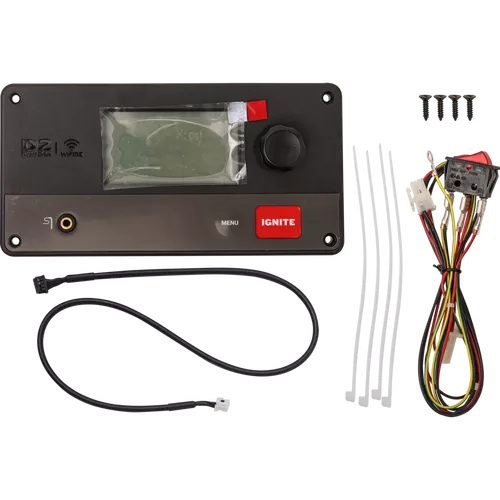
The Brains of Your Pro 575 — Replaced.
The Traeger Pro 575 Controller (KIT0402) is the WiFi-enabled replacement controller for the Traeger Pro 575 pellet grill. This is the unit that manages temperature, connects to the Traeger app on your phone, and keeps your cooks running smoothly from start to finish. If your controller has stopped communicating, lost WiFi connectivity, or is giving you erratic temperature readings, this OEM replacement gets everything back on track.
What it does:
The controller is the command centre of your Pro 575. It reads the temperature probe, manages the auger and fan speeds, and maintains your set temperature throughout the cook. The WiFi connectivity lets you monitor and adjust your grill remotely through the Traeger app — so you can keep an eye on your brisket from the couch, the kitchen, or wherever you happen to be.
Key features:
-
WiFi enabled: Full Traeger app connectivity for remote monitoring and control
-
Firmware updates: Receive updates through the app to keep your grill's software current
-
OEM Traeger part: KIT0402 — exact factory replacement for the Pro 575
-
Direct swap: Designed to drop right into your existing Pro 575 setup
Compatibility:
This controller is designed exclusively for the Traeger Pro 575. It will not work with the Pro 780, Ironwood, Timberline, or other Traeger models — those use different controllers. Double-check your grill model before ordering.
When you need this:
- Your Pro 575 won't connect to the Traeger app anymore
- Temperature swings are wild and the controller isn't holding steady
- The display is glitching, unresponsive, or completely blank
- You've tried a factory reset and things still aren't right
Pro tips:
- Before replacing the controller, try a factory reset first — sometimes that's all it takes
- Snap a photo of the wire connections before disconnecting anything
- After installing the new controller, update the firmware through the Traeger app right away
- Make sure your home WiFi is 2.4 GHz — Traeger controllers don't connect to 5 GHz networks